
BACnet objects as Home Assistant entities
Supported object types
Each BACnet object you import becomes an entity. The default type depends on the object type:
| BACnet object | Default entity | Writable? |
|---|---|---|
| Analog Input | Sensor | No |
| Analog Output | Number | Yes |
| Analog Value | Sensor | Auto-detected |
| Binary Input | Binary sensor | No |
| Binary Output | Switch | Yes |
| Binary Value | Switch | Auto-detected |
| Multi-State Input | Sensor | No |
| Multi-State Output | Number | Yes |
| Multi-State Value | Sensor | Auto-detected |
| Schedule | Sensor (current value) | Via bacnet.write_schedule |
| Trend Log | Sensor (number of records) | No; records via bacnet.read_trend_log |
Inputs are never writable. Outputs always are, because they have a Priority Array, the BACnet mechanism that lets several writers command one object at different priorities (see How writes work). Value objects may or may not accept writes: during setup the integration checks whether the object has a Priority Array. A Value object without one becomes a read-only sensor or binary_sensor.
Analog sensors keep long-term statistics: energy and volume objects as a meter (total_increasing, usable in the Energy dashboard), all others as a measurement. Energy, power, flow and volume units get the device class the Energy dashboard needs. The state class setting in Customize objects changes this per object.
Any object can be given another entity type in Customize objects. Multi-state objects can also become a select that shows their stateText labels, for example Off / Heat / Cool. A setpoint can become a climate entity. See the guides Multi-state as select and Setpoint as climate.
Note: Before 1.0.53, energy and volume sensors were a measurement. After updating, Developer tools → Statistics may list them with a changed state class; click Fix issue there once per sensor. Since 1.0.55, more BACnet units get a Home Assistant unit (L/h, mL/s, m³/s, m³/min, ft³/min, gal/min, gal/h, mL, ft³, gal, J, kJ, MJ and mW). Sensors in these units had no unit before; after updating, click Fix issue once per sensor in Developer tools → Statistics.
Numbers use the object's minPresValue, maxPresValue and resolution as limits and step when the device provides them. Analog sensors keep the full precision of the device value; Home Assistant shows 2 decimals by default, which you can change per entity.
Entity attributes
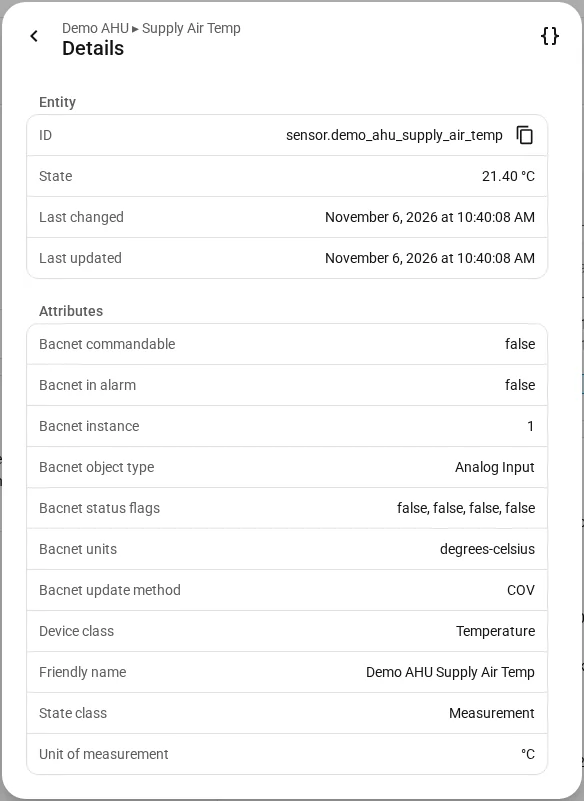
Every entity exposes BACnet metadata as state attributes:
| Attribute | Description |
|---|---|
bacnet_object_type | BACnet object type name, for example "Analog Input" |
bacnet_instance | BACnet object instance number |
bacnet_commandable | Whether this object supports writes |
bacnet_units | Engineering units, for example "degrees-celsius" |
bacnet_description | The BACnet description property |
bacnet_status_flags | The BACnet status flags array |
bacnet_in_alarm | true while the IN_ALARM status flag of the object is set |
bacnet_update_method | How this entity is updated: COV or polling |
bacnet_cov_increment | Configured COV sensitivity (analog objects with active COV only) |
bacnet_state_text | The stateText label of the current state (multi-state objects only) |
Only bacnet_status_flags, bacnet_in_alarm and bacnet_state_text are stored in the recorder history; the other attributes do not change.
An entity is unavailable when the device does not respond. Status flags (in-alarm, fault, overridden, out-of-service) do not change availability, because some gateways report FAULT on every object while their values are live. Check bacnet_status_flags to see them.
Diagnostic sensors
Every device also gets diagnostic sensors, under Diagnostic on the device page:
| Sensor | Enabled by default |
|---|---|
| Last successful poll | Yes |
| COV subscriptions | No |
| Consecutive failed polls | Yes |
They stay available while the device is offline, which is exactly when they are useful.
Other entities on every device
- Write Priority: a select to choose the write priority, disabled by default. See How writes work.
- Refresh object metadata: a button under Configuration that re-reads names, descriptions, units and limits at once.
- Alarm and Active alarms: see Alarms.
Tested devices
BACnet is a standard, so a device that is not listed will most likely work too. The list of tested devices shows what users have actually run with this integration: manufacturer, model, firmware, integration version and what was confirmed to work.