
Guide - add a BACnet device on another subnet
Goal: a BACnet device on another subnet or VLAN is found and added through a BBMD.
Before you start
- A BBMD (BACnet broadcast management device) is available on the network of the device, and you know its address, for example
192.168.2.1:47808. - The BBMD must accept Foreign Device registrations, and UDP port 47808 must be reachable between Home Assistant and the BACnet devices (general BACnet/IP networking advice).
- Only one program can use UDP port 47808 on a machine. Stop other BACnet programs on the same host, or choose a different port.
A BBMD forwards BACnet broadcasts between subnets. Without one, a Who-Is broadcast never leaves the local network, so devices on another VLAN are not found.
Steps
- Go to Settings → Devices & Services → Add Integration and search for BACnet IP.
- On the network page, leave Local IP address (bind) empty.
- Tick Enable BBMD / Foreign Device Registration.
- Fill in BBMD address (IP:port), for example
192.168.2.1:47808.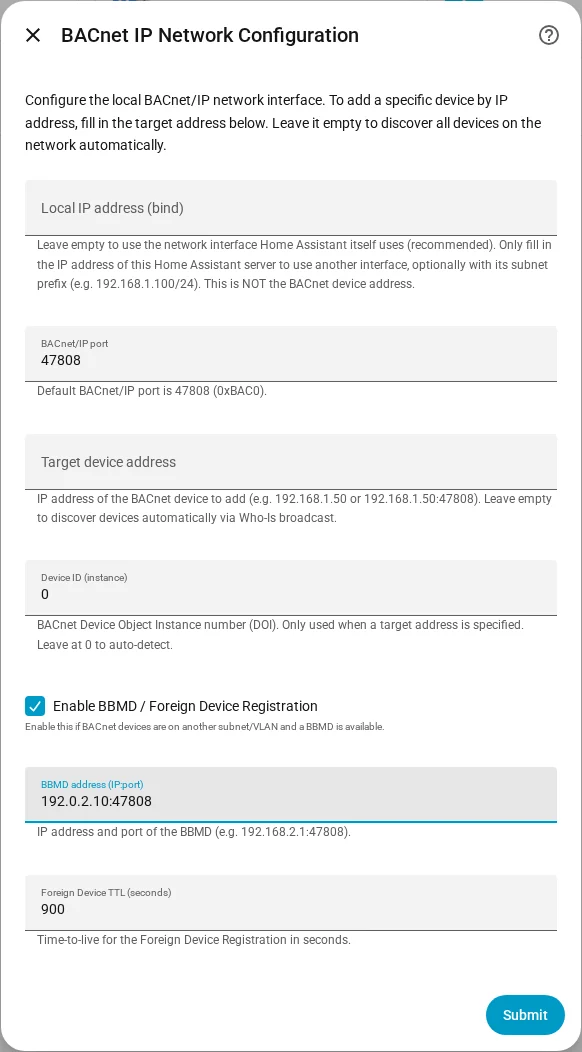
- Leave Foreign Device TTL (seconds) at
900, or change it. - Optionally, fill in Target device address with the IP address of the device. Leave it empty to discover all devices.
- Submit. The integration looks for devices and lists them in Select a BACnet device. Pick yours.
- Choose the objects to import and click Submit.
You should see the device in the dropdown, and then its entities after step 8.
To change the BBMD of a device that is already added, open the ⋮ menu of the integration entry and choose Reconfigure. Entities and options are kept.
If it doesn't work
- "Foreign Device Registration with the BBMD failed": check the BBMD address (IP:port).
- "No BACnet devices were discovered on the network": enter the device address in Target device address.
- "Failed to connect to the BACnet network": check the network settings and the Home Assistant log.
- Still nothing: check that the device is reachable on UDP 47808.
More detail: Getting started and Troubleshooting.