
Guide - use a BACnet setpoint as a climate entity
Goal: a BACnet setpoint appears as a Home Assistant thermostat (climate entity) that also shows the real room temperature.
Before you start
- The device is already added (see Getting started).
- You know which object is the setpoint (usually an Analog Output or a commandable Analog Value) and which object measures the room temperature.
Steps
- Each BACnet device is its own entry, titled with the device name, under Settings → Devices & Services → BACnet IP. Click Configure on the entry of your device.
- Choose Customize objects: type, COV, state class, properties.
- In Objects to customize, pick the setpoint object and click Submit.
- On the next page, set the type field of that object to
climate. In this list every field starts with the object, for example Analog Value (4) - SP - type; the other fields of that object (COV, extra properties, other properties) look the same. Click Submit. - Open Configure again, choose Customize objects again and pick the same object. A temperature sensor field is now available. It lists only Analog Input, Analog Output and Analog Value objects, and not the setpoint itself. Pick the object that provides the room temperature and click Submit. (It only appears after the first save.)
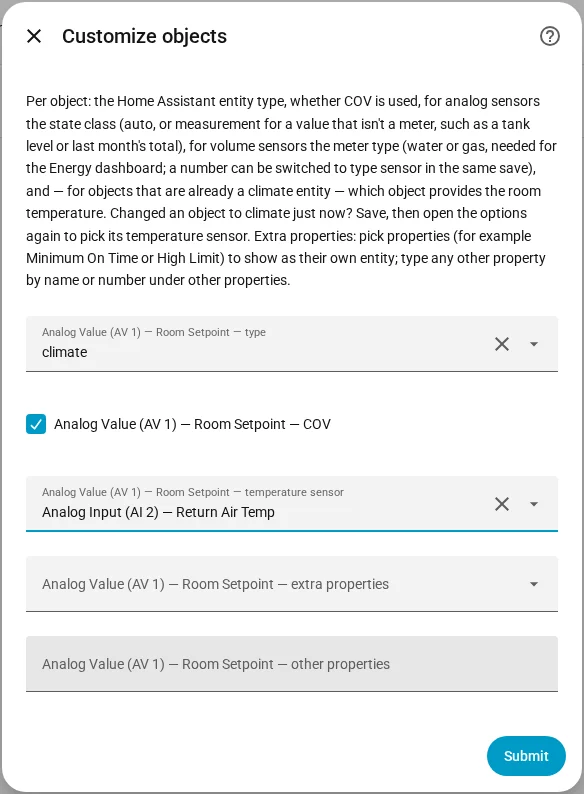
You should see a climate entity with the setpoint and, as current temperature, the room temperature. Without a temperature sensor the entity shows its setpoint as the current temperature.
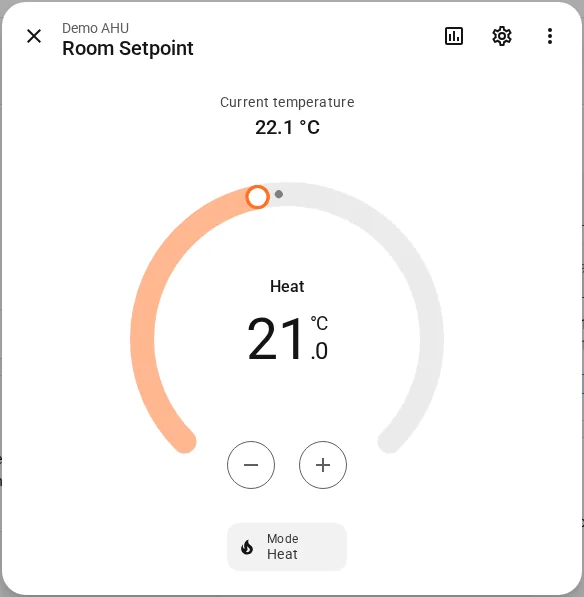
What Off and Heat do
- Changing the target temperature writes the setpoint at the Write Priority of the device (default 16).
- Off relinquishes the setpoint (writes Null), so the schedule or Relinquish Default of the controller takes over.
- Heat writes the setpoint again.
Whether the entity is off is remembered from the last Home Assistant state.
If it doesn't work
- No temperature sensor field: save the change to
climatefirst, then open the options again. - A temperature change is rejected: the device refuses the write. Check the log, and see How writes work.
- The temperature shows the setpoint, not the room: no temperature sensor is chosen.
More detail: Climate and Write priority. A worked automation: Temporary setpoint with a climate entity.