
Guide - show a BACnet multi-state object as a select
Goal: a multi-state object shows its state labels (for example Off / Heat / Cool) in a dropdown instead of a number.
Before you start
- The device is already added (see Getting started).
- The object is a Multi-State Input, Output or Value. The labels come from the
stateTextproperty of the object.
Steps
- Each BACnet device is its own entry, titled with the device name, under Settings → Devices & Services → BACnet IP. Click Configure on the entry of your device.
- Choose Customize objects: type, COV, state class, properties.
- In Objects to customize, pick the multi-state object and click Submit.
- On the next page, set the type field of that object to
select. In this list every field starts with the object, for example Analog Value (4) - SP - type; the other fields of that object (COV, extra properties, other properties) look the same. Click Submit. The integration reloads by itself.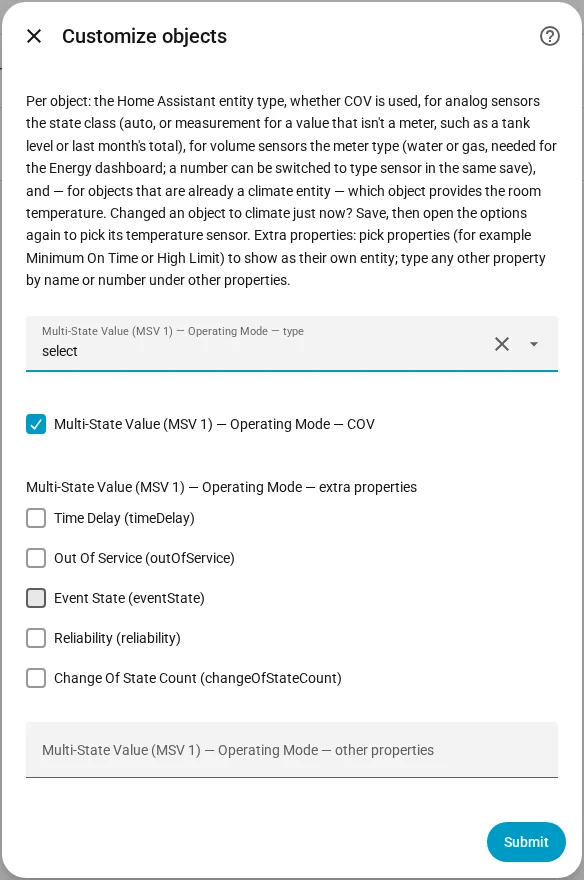
You should see a select entity on the device page that lists the stateText labels. The bacnet_state_text attribute holds the label of the current state.
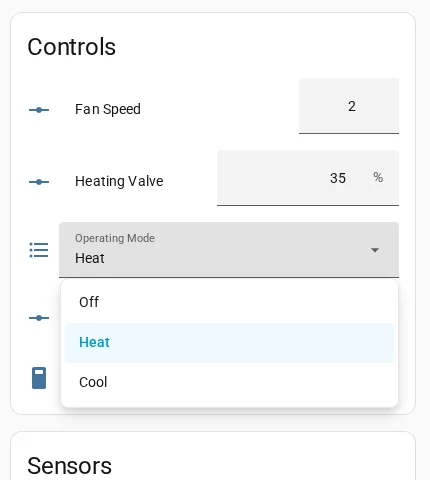
Without stateText on the device, the select shows the numbers 1 to N. A Multi-State Output is a number by default, and a Multi-State Input a sensor. For a commandable object the select can be changed; the write uses the Write Priority of the device.
If it doesn't work
- Selecting a value gives an error: the object is not commandable, or the device rejected the write. Check
bacnet_commandableand the log.
More detail: Customize objects and Entities and attributes.